Chain Mail
Spawn name, install lines and framework snippets for the Chain Mail.
 StreetChain Mail$7.99View release
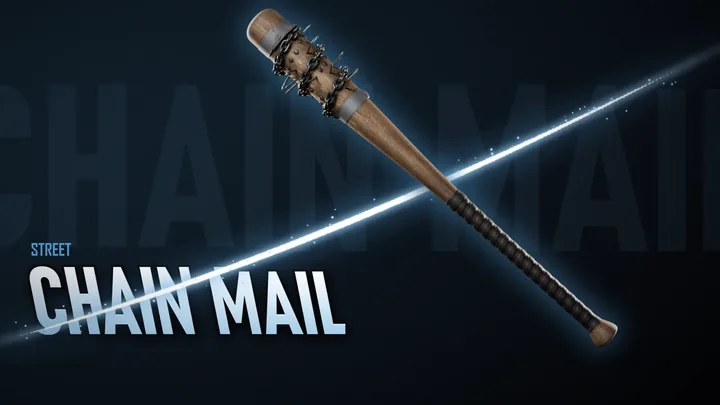
An old weathered bat with steel nails driven right through it, a bright plated chain wound round the barrel and taped down with duct tape, and a black electrical-tape grip.
| Spawn name | Resource | QBCore item | Finish |
|---|---|---|---|
WEAPON_CHAINMAIL | md_chainmail | weapon_chainmail | Static |
Install
Put the folder in your resources folder and add it to server.cfg, after your framework and inventory:
ensure md_chainmailThen do a full restart: weapon metas only load when the server starts. More in Installation.
Framework setup
The same lines are in each weapon's install/ folder.
Inside the items table:
qb-core/shared/items.lua weapon_chainmail = { name = 'weapon_chainmail', label = "Chain Mail", weight = 1000, type = 'weapon', ammotype = nil, image = 'weapon_chainmail.png', unique = true, useable = false, description = "An old weathered bat with steel nails driven right through it, a bright plated chain wound round the barrel and taped down with duct tape, and a black electrical-tape grip." },Inside the weapons table:
qb-core/shared/weapons.lua [`weapon_chainmail`] = { name = 'weapon_chainmail', label = "Chain Mail", weapontype = 'Melee', ammotype = nil, damagereason = 'Melee killed / Whacked / Executed / Beat down / Murdered / Battered' },Copy
install/images/qb-inventory/weapon_chainmail.pnginto your inventory's image folder.
Inside
Weapons = { ... }:ox_inventory/data/weapons.lua ['WEAPON_CHAINMAIL'] = { label = "Chain Mail", weight = 1000, durability = 0.1 },Copy
install/images/ox_inventory/WEAPON_CHAINMAIL.pngintoox_inventory/web/images/.
Inside Config.Weapons = { ... }:
{ name = 'WEAPON_CHAINMAIL', label = "Chain Mail", components = {} },QBCore: use the QBCore tab. ESX or Qbox: inside the items table:
qs-inventory/shared/items.lua ['weapon_chainmail'] = { ['name'] = 'weapon_chainmail', ['label'] = "Chain Mail", ['weight'] = 1000, ['type'] = 'weapon', ['ammotype'] = nil, ['image'] = 'weapon_chainmail.png', ['unique'] = true, ['useable'] = false, ['rare'] = 'epic', ['description'] = "An old weathered bat with steel nails driven right through it, a bright plated chain wound round the barrel and taped down with duct tape, and a black electrical-tape grip." },ESX or Qbox only, inside the weapons table:
qs-inventory/shared/weapons.lua [`weapon_chainmail`] = { ['name'] = 'weapon_chainmail', ['label'] = "Chain Mail", ['weapontype'] = 'Melee', ['ammotype'] = nil, ['damagereason'] = 'Melee killed / Whacked / Executed / Beat down / Murdered / Battered' },Copy
install/images/qs-inventory/weapon_chainmail.pngintoqs-inventory/web/dist/images/.
QBCore, in place of the plain QBCore item (keep the QBCore
shared/weapons.lualine):qb-core/shared/items.lua weapon_chainmail = { name = 'weapon_chainmail', label = "Chain Mail", weight = 1000, type = 'weapon', ammotype = nil, image = 'weapon_chainmail.png', unique = true, useable = false, description = "An old weathered bat with steel nails driven right through it, a bright plated chain wound round the barrel and taped down with duct tape, and a black electrical-tape grip.", x = 2, y = 1, category = 'weapons' },QBX, or ESX in items-file mode:
core_inventory/data/items.lua ['weapon_chainmail'] = { label = "Chain Mail", weight = 1000, stack = false, close = true, description = "An old weathered bat with steel nails driven right through it, a bright plated chain wound round the barrel and taped down with duct tape, and a black electrical-tape grip.", x = 2, y = 1, category = 'weapons' },ESX with the items table: run
install/core_inventory.sql.
Inside the weapons table:
tgiann-inventory/items/weapons.lua weapon_chainmail = { name = 'weapon_chainmail', label = "Chain Mail", weight = 1000, type = 'weapon', ammotype = nil, image = 'weapon_chainmail.webp', unique = true, useable = false, description = "An old weathered bat with steel nails driven right through it, a bright plated chain wound round the barrel and taped down with duct tape, and a black electrical-tape grip.", size = { width = 2, height = 1, rotatable = true } },Copy
install/images/tgiann/weapon_chainmail.webpintoinventory_images/images/.Mark melee weapons as melee in game:
/invadmin> Weapons.
Inside
Weapons = { ... }:codem-inventoryv2/data/weapons.lua ['WEAPON_CHAINMAIL'] = { type = 'weapon', label = "Chain Mail", weight = 1000, durability = 0.1, description = "An old weathered bat with steel nails driven right through it, a bright plated chain wound round the barrel and taped down with duct tape, and a black electrical-tape grip." },Copy
install/images/codem/WEAPON_CHAINMAIL.pngintocodem-inventory-images/images/.
Inside the weapons table:
ak47_inventory/shared/weapons.lua ['WEAPON_CHAINMAIL'] = { label = "Chain Mail", weight = 1000, durability = 0.1 },Use
install/images/ox_inventory/WEAPON_CHAINMAIL.pngfor the icons.
Add to the weapons list in vMenu/config/addons.json, keeping any entries you already have:
"weapons": [ "WEAPON_CHAINMAIL" ]Test it
| Framework | Command |
|---|---|
| QBCore | /giveitem [id] weapon_chainmail 1 |
| ox_inventory | /giveitem [id] WEAPON_CHAINMAIL 1 |
| ESX | /giveweapon [id] WEAPON_CHAINMAIL 0 |
| qs, core, tgiann | /giveitem [id] weapon_chainmail 1 |
| CodeM, ak47 | Their admin give command, with WEAPON_CHAINMAIL |
| vMenu | Weapon Options → Addon Weapons |
Extras
mdev-weaponsback already knows this weapon: carry it on your back with no setup.
mdev-weaponicons gives it its own weapon wheel icon. It's a thank-you for customers, in the Customer downloads forum of our Discord.